It never sees your raw schema
The model is shown a curated set of business views with clean names and written definitions — not your hospital tables, and not patient identity columns for users who are not cleared.
Two questions decide whether a hospital IT head says yes: can this slow down or corrupt our clinical system, and who can see patient data. Both are answered below without hedging.
Prism connects to a hospital system using a read-only login and never writes to it. Analysis runs against a separate reporting database, so clinical systems are unaffected. Access is role-based by unit and department, patient identity is masked unless a user is cleared, and every login, report and question is logged.
The login Prism uses on your hospital system has read rights and nothing more. It is not technically capable of writing to a clinical system. Your DBA creates it and can verify the grant.
Analysis never runs against the database your wards and billing counters depend on. Month-end reporting cannot slow down a discharge.
A department head sees their department, a unit head their unit. The restriction is applied by the platform to every query, including queries produced by the Ask box.
Names and contact numbers are hidden unless a user is specifically cleared, and each time they are viewed it is recorded. Most management dashboards work on aggregates and never need identity at all.
Hospital database passwords are encrypted with a key held outside the database and are never displayed again after entry. A database dump alone does not yield access to your system.
Every login, every report run, every question asked and the exact query it produced — recorded with the user, the time and the result count. When an auditor asks who saw what, there is an answer rather than an assurance.
Twenty years, bootstrapped, still owned by the people who built it. 1,000+ hospitals across India and 12+ countries.
Worth being precise about, because most vendors are vague here.
The model is shown a curated set of business views with clean names and written definitions — not your hospital tables, and not patient identity columns for users who are not cleared.
Unit and department restrictions are applied by the platform after the query is generated. The model is never asked to add a filter, because anything that can be asked can also be persuaded.
The Ask box connects through a database account with read permission only. Even if every other safeguard failed, that permission holds.
The audit trail is a dashboard, not a table nobody opens.
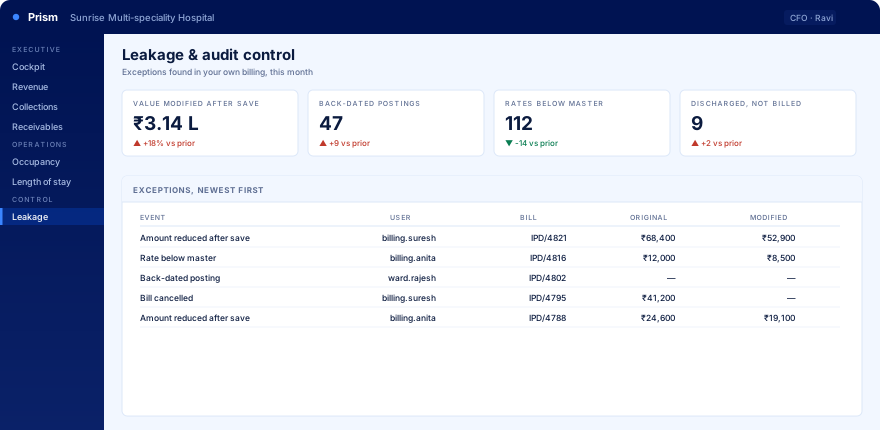
Illustrative data shown.
No. Prism is a separate product and works with any hospital information system. Where a direct database link is possible we read from it; where it is not, your team uploads spreadsheets and Prism builds the same dashboards from those. Hospitals running Caresoft HIS get a faster start because the schema is already understood, but that is a head start, not a requirement.
Yes. The spreadsheet route exists for exactly this. You export the data you are willing to share, upload it, and Prism runs the same transformations it would have run over a live link. The numbers come out identical. Many hospitals begin this way and connect the database later once they trust the output.
No. Prism copies data into its own reporting database and every dashboard runs against that copy. The login it uses on your system has read rights only and cannot write to it. Your billing counters and wards are unaffected.
Patient identity is masked by default. Only users you specifically clear can see names and contact numbers, and every time they do it is recorded. Most management dashboards never need identity at all, since they work on aggregates.
Typically four weeks: connect and run the readiness checks in week one, financial dashboards in week two, operational dashboards in week three, and handover in week four. That assumes reasonably clean data, which the week-one readiness report tells you honestly rather than discovering in week three.
Someone in management types a question in plain English and gets back a table or a chart built from your own data. If the answer is useful they pin it and it becomes a permanent dashboard tile. It means new requirements do not need a change request, and it is why the product does not go stale six months after it is installed.
Yes, in detail. Every question is metered: which user asked it, which dashboard or report it belongs to, how many tokens it consumed and what that cost. The token log is visible to your administrators, not just to us, and each plan carries a monthly allowance you can watch against.
No. Prism reads the same source data your existing reports read, and where a report is worth keeping it can be registered and run on schedule, with its output landing in Prism alongside everything else. Existing reports keep working throughout.
That is normal, and Prism tells you rather than producing a confident wrong number. A readiness console checks fill rates on the fields each dashboard depends on and marks which modules your data can genuinely support today. Where a field is not being captured, that is a process fix, and it is better to know in week one.
One hospital, one month of your data, and the exception list from your own billing.